Dooflix APK Download Latest Version 2026
Android 7.0+
Latest
October 19, 2026
Varies
Entertainment
100K+
DooFlix
Free
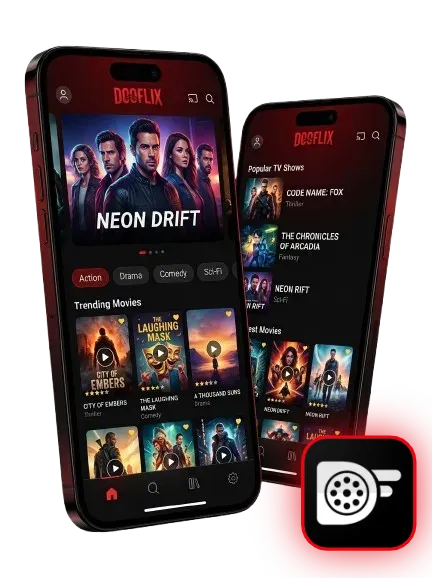
DooFlix is a popular entertainment app for Android that helps users discover movies, TV shows and web series in one clean interface. Many people search for it as Dooflix APK, Dooflix Mod APK or even the common misspelling Doofix. This guide explains what Dooflix APK is, what features it offers, how to install it on Android, Android TV, FireStick, PC and Mac, and what you should know about safety before you download any APK file.
Dooflix APK Download – Mod APK Latest Version
Below is a quick overview of the Dooflix APK download so you can check compatibility before installing the latest build or its mod version.
Latest Version and App Information
| App Name | DooFlix |
| Category | Entertainment |
| Platform | Android, Android TV, FireStick |
| Requires | Android 7.0 and up |
| Price | Free |
| Updated | 2026 |
Dooflix APK Download Requirements
- An Android phone, tablet, Android TV or FireStick running Android 7.0 or later
- At least 2 GB of RAM for smooth performance
- Around 100 MB of free storage
- A stable internet connection (5 Mbps or faster recommended for HD)
- “Install unknown apps” permission enabled for your browser or file manager
What Is Dooflix Mod APK?
Dooflix App Overview
DooFlix is a movie and TV show discovery app, and the APK file is simply its Android installation file. It lets you browse trending and popular titles, explore genres, watch official trailers, check ratings and release dates, and save favorites to a watchlist. The official version is listed on the Google Play Store with over 100,000 downloads and states clearly that it does not host movies or TV shows. It only provides information, trailers and metadata from publicly available sources.
Official App and Modified APK Difference
A “mod APK” is a version of an app changed by a third party, usually to remove ads or unlock paid options. These builds are not made or checked by the original developer. That means they may be outdated, may not receive security fixes and may contain unwanted code. The official Play Store version is always the safest choice. If you choose to install any APK file from outside the Play Store, only use a source you trust and scan the file first.
| Point | Official App | Modified APK |
|---|---|---|
| Source | Google Play Store | Third-party websites |
| Security checks | Google Play Protect | None guaranteed |
| Updates | Automatic | Manual |
| Developer support | Yes | No |
Dooflix Features
Movies and TV Shows
With Dooflix you can discover trending movies and popular TV shows from around the world. Each title page shows a summary, cast details, release date and rating, so you can decide what to watch next without jumping between apps.
HD Quality and Streaming Options
Trailers and previews play in HD with adaptive quality, so playback adjusts to your connection speed. A fast Wi-Fi connection gives the sharpest picture on large screens such as smart TVs.
Search and Watchlist
Smart search and genre filters help you find titles quickly. Tap the save button to add anything to your watchlist and come back to it later.
Audio and Subtitle Support
Multilingual information makes the app useful for viewers who prefer Hindi, English, Tamil, Telugu and other languages.
Interface and Viewing Controls
The clean, modern design works well on phones, tablets and TV screens. Dark mode, simple navigation and remote-friendly menus make browsing comfortable on Android TV and FireStick.
Dooflix Content and Entertainment
Movies, Web Series and TV Content
Browse information about Hollywood and Bollywood films, South Indian cinema, Turkish dramas, web series, documentaries, anime and kids’ titles, all organized into easy sections.
Genre-Based Discovery
Explore action, comedy, drama, thriller, horror, romance, sci-fi, family and more. Trending and “new release” lists help you stay updated with the latest entertainment.
Regional and Multilingual Content
DooFlix covers regional categories, which makes it a handy guide for viewers who follow content in more than one language. To actually watch full titles, use licensed services such as Netflix, Amazon Prime Video or JioHotstar.
How to Install Dooflix APK
Android Installation
- Open Settings > Security (or Apps > Special access) and allow “Install unknown apps” for your browser.
- Download the APK file from a trusted source.
- Open your Downloads folder and tap the APK file.
- Tap Install and wait a few seconds.
- Open Dooflix and start exploring.
Tip: If the Play Store version is available in your country, installing from there is quicker and safer.
Android TV and Smart TV Installation
- On your TV, go to Settings > Device Preferences > Security and enable unknown sources.
- Install the Downloader app from the Play Store.
- Enter the APK link in Downloader and install the file.
- Alternatively, copy the APK to a USB drive and open it with a file manager on the TV.
For FireStick: go to Settings > My Fire TV > Developer Options, turn on “Install unknown apps” for Downloader, then follow the same steps.
PC and Mac Installation
- Download an Android emulator such as BlueStacks for Windows 10/11 or macOS.
- Install and sign in to the emulator.
- Drag and drop the APK file into the BlueStacks window, or use the “Install APK” button.
- Launch Dooflix from the emulator home screen.
Enable virtualization (Intel VT-x or AMD-V) in your BIOS for better emulator speed. Full steps are in our Dooflix for PC guide. iPhone users can read Dooflix for iOS.
Dooflix Device Compatibility
Supported Android Devices
Dooflix runs on phones and tablets from Samsung, Xiaomi, Oppo, Vivo, Realme, OnePlus, Motorola and other brands running Android 7.0 or later. Using an older phone? See Dooflix for old devices.
Windows and macOS
Through an emulator, the app works on Windows 7, 8, 10 and 11 and on macOS, including Intel and Apple Silicon Macs. At least 4 GB of RAM is recommended.
Android TV and FireStick
Dooflix supports Android TV boxes, Google TV, Sony and TCL smart TVs, and Amazon FireStick. Chromecast users can cast from a phone.
Dooflix APK Pros and Cons
Potential Advantages
- Clean and easy interface
- Large catalog of movie and TV information
- Watchlist and favorites
- Works on phones, TVs and PC
- Free to use
Possible Limitations
- Modified APKs are not verified by the developer
- No automatic updates outside the Play Store
- Some features may not work with a VPN
- Full movies must be watched on licensed platforms
Frequently Asked Questions
What Is Dooflix Mod APK?
Dooflix Mod APK is a third-party modified version of the DooFlix entertainment discovery app. The official app is available on the Play Store.
Is Dooflix Available on the Play Store?
Yes. An official DooFlix discovery app is listed on the Google Play Store for Android 7.0 and above.
Can I Install Dooflix on Smart TV?
Yes. You can install it on Android TV, Google TV and Fire Stick using the Downloader app or a USB drive, as explained above.
Is Dooflix APK Safe to Use?
The Play Store version is checked by Google Play Protect and is the safest option. APK files from other websites carry risk, so scan them with antivirus software and never grant unnecessary permissions.
Final Thoughts on Dooflix Mod APK
Dooflix is a simple way to discover trending movies and TV shows, watch trailers and build a watchlist on Android, smart TVs and PC. For the best security and updates, use the official version whenever possible, and watch full content through licensed streaming services.
More guides: Dooflix for PC · Dooflix for iOS · Dooflix for Old Devices · Dooflix Alternatives · Blog · Is Dooflix Safe? · How to Update